灵妆LingGlow

macOS 本地主题工具A local macOS theme workspace

给你的 AI,
换上喜欢的样子。
Make your AI
feel more like yours.

灵妆为 WorkBuddy、Codex 与豆包准备一处有边界的主题工作台。先预览,再确认;只在本机发生。LingGlow is a bounded, local theme workspace for WorkBuddy, Codex, and Doubao. Preview first, confirm deliberately, and keep it on your Mac.

本机运行Runs locally不读取你的对话与文件Does not read your chats or files
先预览Preview first每次切换都需明确确认Every change needs your confirmation
可恢复Reversible一键回到官方界面Return to the native look anytime
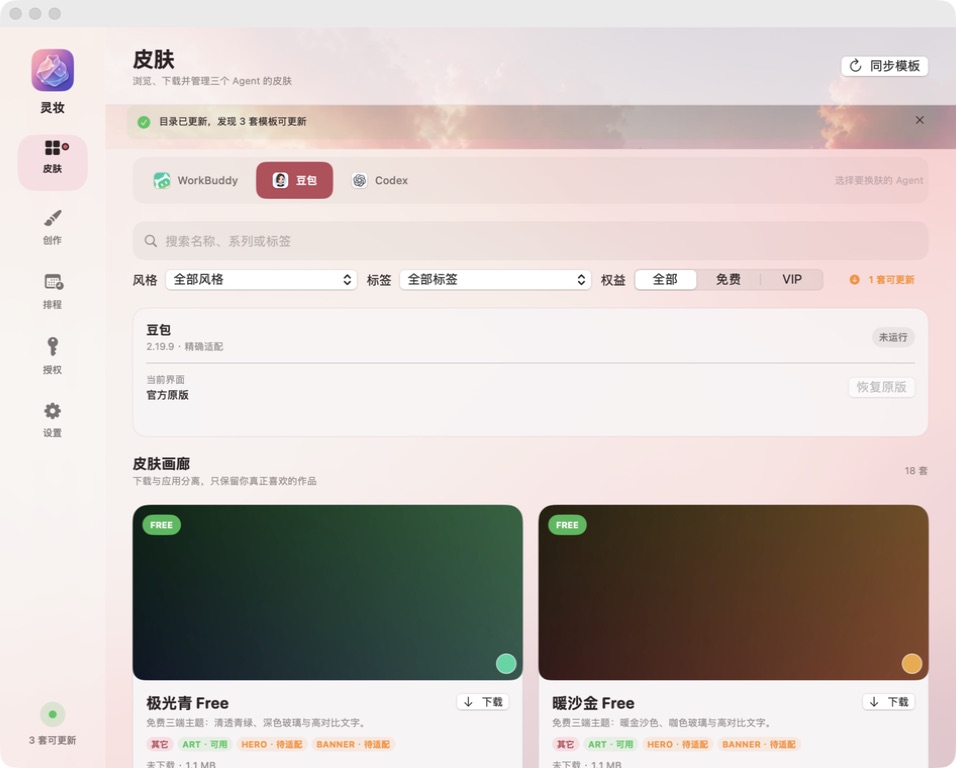
灵妆真实皮肤目录界面截图
真实客户端截图Real client screenshot
官网精选推荐Featured on the official site

不把“可设计”说成“已适配”。We do not call a concept a verified integration.

WorkBuddy 精确验证Exact validationCodex 基础安全层Safe base layer豆包 仅设计草稿Design drafts only

GitHub 推荐皮肤Featured GitHub skins

只展示值得推荐的,
保持官网清爽。
Only the best picks,
kept clear and focused.

这里直接读取 LingGlow 公开 GitHub 目录,但官网只展示带有 featured 标记的推荐皮肤。完整目录仍可在 GitHub 查看。This page reads LingGlow’s public GitHub catalog, while the official site displays only skins marked featured. The full catalog remains available on GitHub.

正在从 GitHub 同步推荐皮肤…Syncing featured skins from GitHub…

主题素材与应用分发解耦:在灵妆中按需下载,完成 SHA-256 完整性校验后再应用。Theme assets are delivered separately from the app: download on demand in LingGlow, verify SHA-256 integrity, then apply locally.

公开 Skin SkillPublic Skin Skill

把灵感做成
能安全使用的皮肤。
Turn an idea into
a skin that is safe to use.

skin-abstract 是灵妆公开的皮肤制作 Skill。它把主题设计、三端适配、素材权利、交互 QA 与远程目录打包放在同一条可验证的工作流里。skin-abstract is LingGlow’s public skin-making Skill. It joins design, three-client adaptation, asset rights, interaction QA, and remote-catalog packaging in one verifiable workflow.

在 GitHub 查看 Skill ↗View the Skill on GitHub ↗
01

安装 SkillInstall the Skill

在 Codex 中直接提出下面这句话;也可以把公开目录放到本机的 Skills 文件夹。Ask Codex directly with the prompt below, or place the public directory in your local Skills folder.

从 AI-Scarlett/LingGlow 的 skills/skin-abstract 安装皮肤制作 Skill。Install the skin-making Skill from AI-Scarlett/LingGlow at skills/skin-abstract.

手动位置:~/.codex/skills/skin-abstract/Manual location: ~/.codex/skills/skin-abstract/

02

准备一套可用素材Prepare usable assets

明确浅色或深色模式,并准备一个全局背景、独立的 Codex 3:1 首页图,以及真实 Alpha 通道的 WorkBuddy 吉祥物。Choose light or dark mode and prepare one global background, a distinct 3:1 Codex home image, and a WorkBuddy mascot with a real alpha channel.

16:10全局背景Global background3:1Codex 首页图Codex home artα透明吉祥物Transparent mascot
03

适配、验证与打包Adapt, verify, package

Skill 会要求在 WorkBuddy、豆包和 Codex 的真实界面中测试主页、历史、输入框、菜单、弹窗和回滚;通过后再输出声明式 Theme Pack。The Skill requires real-client checks in WorkBuddy, Doubao, and Codex: home, history, composer, menus, dialogs, and rollback. Only then does it output a declarative Theme Pack.

查看完整制作方法 ↗Read the full guide ↗

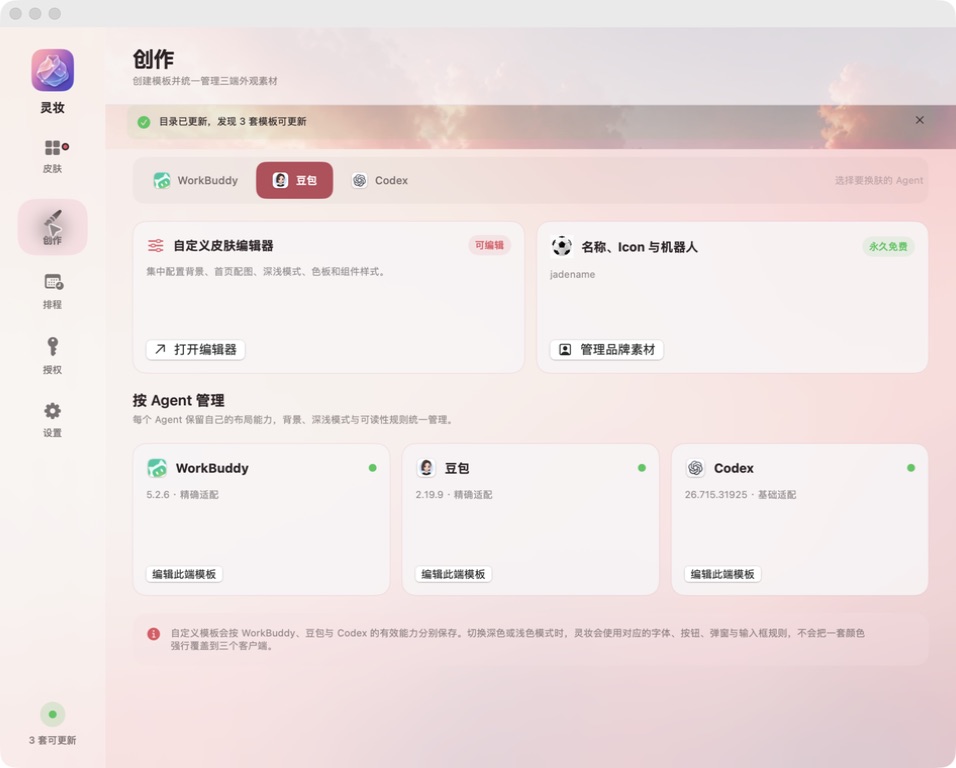
真实创作工作台The real creation workspace

在一个界面里管理皮肤的名称、图标与机器人,以及每个 Agent 的适配能力。Manage a skin’s name, icon, mascot, and per-Agent compatibility from one workspace.

网站中的截图来自当前安装的灵妆客户端,而不是概念渲染。The screenshot on this site comes from the currently installed LingGlow client, not a concept rendering.

灵妆真实创作工作台界面截图
灵妆 · 创作页面LingGlow · Create screen

公开目录只接收已完成素材权利审查、三端截图与交互验证、回滚验证,并经维护者确认的皮肤。Skill 不会自动发布未确认的作品。The public catalog only accepts skins that have passed asset-rights review, three-client screenshots and interaction checks, rollback verification, and maintainer approval. The Skill never auto-publishes unapproved work.

当前兼容性Current compatibility

明确告诉你,
现在能做到什么。
Be clear about
what works today.

灵妆按已验证程度开放能力,而不是为了好看把边界藏起来。LingGlow opens capabilities according to evidence, rather than hiding the boundary for a prettier claim.

Codex 应用图标generic-safe

Codex

只开放背景、色板与基础玻璃层;不宣称已完成精确界面适配。Offers background, palette, and a base glass layer only; it does not claim exact interface adaptation.

  • 背景与色板Background and palette
  • 基础玻璃层Base glass layer
  • 官方主题字符串导出Official theme-string export
豆包应用图标设计草稿Design drafts

豆包

当前仅可发现与保存本地设计草稿,不会启动、注入、重启或自动应用。Currently it can only discover and save local design drafts. It will not launch, inject, restart, or auto-apply anything.

  • 只读发现Read-only discovery
  • 静态 Adapter 审计Static adapter audit
  • 草稿隔离保存Isolated draft storage

产品事实与常见问题Product facts & FAQ

给用户、搜索引擎和 AI,
一个清楚的答案。
Clear answers for people,
search engines, and AI.

灵妆的能力边界、皮肤制作方式和安全原则都以可验证的公开资料为准。LingGlow’s capability boundaries, skin-making flow, and safety principles are grounded in verifiable public documentation.

灵妆是什么?What is LingGlow?

灵妆是运行在 macOS 本机的 AI 助手主题与换肤工具,提供皮肤预览、下载、应用与恢复流程。LingGlow is a local macOS theme workspace for AI assistants, with skin preview, download, application, and recovery flows.

目前适配哪些 AI 客户端?Which AI clients are supported?

WorkBuddy 已完成精确验证;Codex 仅提供基础安全层;豆包目前仅提供设计草稿能力。WorkBuddy has exact validation; Codex currently offers a safe base layer; Doubao is limited to design drafts.

如何制作并发布自己的皮肤?How do I create and publish a skin?

安装公开的 skin-abstract Skill,准备合规素材,在真实客户端完成交互与回滚验证;进入官方目录前还需通过维护者审查。Install the public skin-abstract Skill, prepare compliant assets, complete real-client interaction and rollback checks, then pass maintainer review before entering the official catalog.

你始终保有控制权You stay in control

好看,不应该以失控为代价。A better look should not cost you control.

灵妆只控制经过校验的显示层。它不解包、不重打、不替换目标应用,也不读取对话正文、Cookie、账号或项目文件。LingGlow only controls verified display layers. It does not unpack, re-sign, or replace target apps, and it does not read chat bodies, cookies, accounts, or project files.

查看安全说明Read security notes
01

先检验,再切换Validate before switching

每次操作前重新检查签名、版本与兼容性。Re-check signature, version, and compatibility before every action.

02

一次确认,只用一次One confirmation, one use

短时效、单次使用的确认操作绑定当前应用指纹。A short-lived, single-use confirmation is bound to the current app fingerprint.

03

随时回到原样Return to native anytime

恢复原版不会删除你的对话、项目、登录状态或原有配置。Restoring the native look does not delete your chats, projects, sign-in state, or existing settings.

macOS

把你的 AI 工作台,
换成更像你的样子。
Make your AI workspace
feel more like yours.

前往下载页Go to downloads

支持 Apple Silicon 与 Intel Mac
Developer ID 签名与 Apple 公证
For Apple Silicon and Intel Macs
Developer ID signed and Apple notarized